Showing posts with label Migration. Show all posts

Friday, 15 August 2014

Exchange 2007 to 2013 Migration: Get-Content C:\userlist | New-MoveRequest -TargetDatabase "The operation couldn't be performed because object ' user' couldn't be found on 'dc.domain.local"

This post is not particularly a complex or interesting fix, I am posting it here for my own reference should I ever need to do something similar again. Who knows hopefully you find it useful too!
I was recently working on an Exchange 2007 to 2013 migration for a client and part of the project was to implement Database Availability Groups (DAG's) and segment mailboxes into Mailbox Databases by each department in the business. To do this I requested a list of users in each department from the client. The list had been generated by Active Directory and unfortunately all of the user names had a two space characters at the beginning of the string.

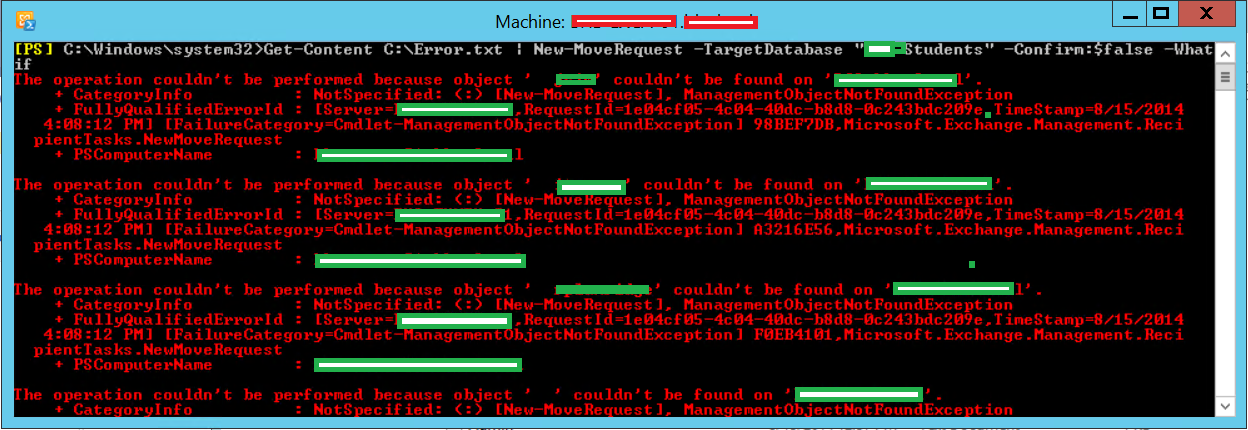
When I use the following command with the -Whatif switch to test my syntax and text file I receive an error.
Get-Content C:\Error.txt | New-MoveRequest –TargetDatabase “Mailbox Database” –Confirm:$false -Whatif

The operation couldn't be performed because object '  user' couldn't be found on 'dc.domain.local' this was because of the two space characters before each of the usernames in the C:\Error.txt file. 
I copied the lists of users over into an Excel spreadsheet, and used the following formula to remove the first two characters from the user name strings;
=RIGHT(A1, LEN (A1)-2)


This was in the column on the right of the user names, you can then drag the box down to populate all of the cells and the magic of Excel changes A1 to A2, A3,A4 etc. I then simply copy and pasted this back into a text file.


Now if I run the command again, the Exchange Shell does What if: Creating move request for each of the user accounts. If I were to remove the -Whatif­ switch, the Exchange Shell would begin migrating all of the users in the text file over to the new database.
Get-Content C:\Error.txt | New-MoveRequest –TargetDatabase “Mailbox Database” –Confirm:$false -Whatif

Sunday, 10 August 2014

Exchange 2007 SP3: Domain Company.pri cannot be contacted or does not exist. It was running command 'get-recipient -ResultSize '1000' -SortBy 'DisplayName' -RecipientType 'UserMailbox'. The specified Domain either does not exist or could not be contacted

I have been doing some testing for a client domain upgrade and Exchange migration. I upgraded my Windows Server 2008 R2 (2003 functional level) to new Windows Server 2012 R2 Domain Controllers, I have post written that documents this process. Once I completed the upgrade when I launched the Exchange Management Console I recieved the following error Domain Company.pri cannot be contacted or does not exist. It was running command 'get-recipient -ResultSize '1000' -SortBy 'DisplayName' -RecipientType 'UserMailbox'. The specified Domain either does not exist or could not be contacted.
I knew the upgrade had completed successfully as I did a number of replication and domain health checks. As part of the upgrade I had forgot to change the Primary DNS Server, when I did nslookup on the Exchange server it cannot resolve a DNS server which was in fact one of the old DC's. Since I have demoted and decommissioned the legacy DC's I need to reconfigure the static DNS settings for my servers.

Configure DNS on each of the server to point towards the new Domain Controllers.

Run nslookup again and it will not resolve one of the new DC's.

Launch the Exchange Management Console and the error is gone!

It's a pretty simple fix and careless mistake! But that's what testings for. Your clients will most probably be addressed with DHCP, you would also have to change the DNS Server options in your DNS scopes to point towards the new servers.